
What do I recommend?
Currently we use a combination of OurPact and Apple Screen time. OurPact works great for Apple devices like iPhone & iPad. Where OurPact falls short is the inability to set a time limit for apps individually or by category.
If you are an android user Qustodio is great!
If you are needing to monitor Social Media Bark is your only option.
Why These Tools Stand Out
- Device Control: Manage individual devices by setting screen time limits, restricting certain settings, and controlling app usage.
- Ease of Use: Designed with non-technical users in mind, each tool offers a straightforward set-up process and intuitive interfaces.
- Quick Set-Up: Get up and running quickly with tools that guide you through installation and configuration, so you can focus on what matters most—your child’s safety.
- Cost-Effective Solutions: Enjoy the benefits of advanced parental controls without the need to navigate complex pricing—focus on the features that deliver value to your family.

Website: https://ourpact.com/
OurPact simplifies app management and screen time scheduling for both iOS and Android devices. It empowers you to set daily limits and block access to specific apps, making it an excellent choice for those who need straightforward device control.
Available for both iOS and Android smartphones and tablets.
Key Features:
- Device Control: Schedule app access and set screen time limits
- Ease of Use: Intuitive interface designed for non-technical users
- Simple Set-Up: Guided installation ensures quick configuration
- Overall Value: Provides essential control without unnecessary complexity

Website: https://www.bark.us/
Bark goes beyond simple screen time management by monitoring texts, emails, and social media for signs of harmful content. It is particularly effective in alerting parents to potential issues, while keeping the focus on digital safety.

Branded Phone and Smart Watch Option
Key Features:
- Monitoring Capabilities: Monitors texts, emails, and social posts for potential risks
- User-Friendly: Designed for ease of monitoring without deep technical know-how
- Remote Management: Access insights and alerts from anywhere
- Overall Value: Balances robust monitoring with a non-intrusive approach
Website: https://www.qustodio.com/en/
Qustodio provides comprehensive monitoring for multiple devices—including iOS, Android, Windows, macOS, and more—making it ideal for families with diverse device ecosystems. It emphasizes control by device with detailed usage reports.
Key Features:
- Device Control: Customizable restrictions per device
- Content & Web Filtering: Blocks inappropriate content and harmful sites
- Monitoring: Detailed usage reports for informed decisions
- Ease of Set-Up: Straightforward installation process for all devices

Website: https://www.pinwheel.com/
Pinwheel offers an innovative approach to parental controls with features designed to ensure that digital interactions remain safe and balanced. It focuses on clear control and flexible management, making it a strong contender for digital families.
Branded Phone or Smartwatch
Key Features:
- Comprehensive Control: Balances device restrictions with monitoring tools
- Ease of Use: Clean design that simplifies navigation and management
- Flexible Set-Up: Adapts to a range of devices and usage scenarios
- Overall Value: Provides peace of mind with advanced, yet accessible, controls
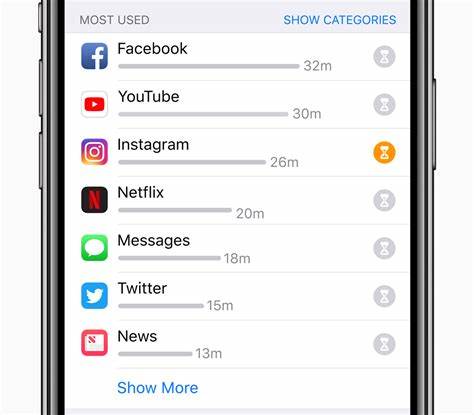
Apple Screen Time is built into iOS and macOS, offering native controls that help manage device usage without requiring additional software.
Exclusively available on Apple devices, including iPhones, iPads, and Macs.
Key Features:
- Device Control: Restrict changes to device settings, enforce app limits, and manage screen time
- Ease of Use: Seamless integration within Apple’s ecosystem ensures minimal set-up hassle.
- Robust Set-Up: Leverages native operating system features for reliable performance
- Overall Value: A cost-effective solution with built-in safety measures
Google Family Link is a free solution designed to help you monitor and manage your child’s digital experience.
I do not recommend Google Family Link in any capacity due to limited controls and the stance they have that at 13 years old the user can opt out of management
Primarily designed for Android smartphones and tablets, with limited support on iOS devices.
Key Features:
- Device Control: Set daily screen limits and manage app activity on Android devices
- Ease of Use: Simple set-up with an intuitive interface designed for non-technical users
- Basic Monitoring: Offers essential insights into device activity
- Overall Value: A reliable, cost-free solution that covers the basics of digital safety
 TMGT
TMGT 